
[emacs] how to use tex on emacs tutorial3- section
참조
page layout basic tex about figure table about cv
section
tex문서에서 section은 heading으로 봐도 된다.다음 예를 보자.
 \documentclass[a4paper]{article}
\usepackage{blindtext}

\begin{document}
\section{First Section}
\blindtext
\section{Second Section}
\blindtext
\section{Third Section}
this is third section
\end{document}
그런데 section다음의 문단이나 문장은 paragraph처럼 indent가 되지 않는다.
subsection
section이란건 1,2,3처럼 표시된다. 각각의 section마다 subsection을 만들면, 1.1, 1.2처럼 보이게 된다. 해보자.
\documentclass[a4paper]{article}
\usepackage{blindtext}

\begin{document}
\section{First Section}
\subsection{First subsection}
\blindtext
\section{Second Section}
\subsection{second subsection}
\blindtext
\section{Third Section}
this is third section
\end{document}
강의에서는 section이나 subsection에 있는 numbering이 중요하다고 한다. 왜냐하면 나중에 참조할때 numbering을 이용하기 때문이라고 한다.
table of contents
toc를 보이게 하는 명령어가 있다. \tableofcontents라는 명령어다. test해보자.
\documentclass[a4paper]{article}
\usepackage{blindtext}

\begin{document}
\tableofcontents
\section{First Section}
\subsection{First subsection}
\blindtext
\section{Second Section}
\subsection{second subsection}
\blindtext
\section{Third Section}
this is third section
\end{document}
그런데 compile하면 보이지 않는다. 이것은 tex의 특징이라고 한다. 처음에 compile하면 section정보를 저장만 하고 보여주지 않는다. 다음에 한번더 compile하면 tableofcontents는 이전에 저장된 section정보를 가지고 table of contents를 만든다고 한다. 그래서 toc를 사용할때 명심해야 할것은 toc는 update를 다음 compile때 한다는 것이다. 현재는 간단한 예제라서 toc보면 모두 1page를 가리킨다. 이것을 update해보자. 여기서 blindtext를 유용하게 사용할 수 있는 tip이 있다. 예를 들어서 blindtext의 5배를 하고 싶으면 다음과 같이 한다.
\blindtext[5]
이렇게 하면 toc가 가르키는 page numbering이 변하게 될것이다. 두번 compile때 toc가 update되는걸 확인할 수 있다.
\documentclass[a4paper]{article}
\usepackage{blindtext}

\begin{document}
\tableofcontents
\section{First Section}
\subsection{First subsection}
\blindtext[10]
\section{Second Section}
\subsection{second subsection}
\blindtext[10]
\section{Third Section}
this is third section
\end{document}
title,author,date 설정
title이란건 문서가 가진 특성인데, 이런 문서에 반드시 하나만 존재하는 특성들이 있는데, title, author, date같은게 있다. 이것은 통털어 title이라고 부르기도 한다. title요소들은 document block에 정의하지 않고, 밖에 정의한다. 그렇지만 문서안에 보여져야 하기 때문에, document block에서 maketitle이란 명령어를 수행해서 처리한다. 예를 들어보자. 여기서는 date는 정의하지 않는다. 그러면 현재 날짜가 default로 저장된다.
\documentclass[a4paper]{article}
\usepackage{blindtext}
\author{holy}
\title{holy draft}

\begin{document}
\maketitle
\tableofcontents
\section{First Section}
\subsection{First subsection}
\blindtext[10]
\section{Second Section}
\subsection{second subsection}
\blindtext[10]
\section{Third Section}
this is third section
\end{document}
수행하면 상단에 제목,작성자,날짜가 표시되는걸 볼수있다. 그런데 문서형태에 따라 title을 하나의 page로 처리하는 문서형태도 있다. 우리는 article을 사용하기 때문에 title에 해당하는것은 작은 형태다.
report
page하나를 통채로 title page로 사용하는 문서형태는 report라는게 있다. report를 사용해보자.
\documentclass[a4paper]{report}
\usepackage{blindtext}
\author{holy}
\title{holy draft}

\begin{document}
\maketitle
\tableofcontents
\section{First Section}
\subsection{First subsection}
\blindtext[10]
\section{Second Section}
\subsection{second subsection}
\blindtext[10]
\section{Third Section}
this is third section
\end{document}
report가 정의하는 문서형태는 article과 다르다. article에서의 문서형식은 section과 subsection으로 나눠진다. report는 좀 다르다. section위에 chapter라는 더큰 heading이 있다. 우리는 chapter를 정의하지 않았기 때문에 문서를 보면 first section이 0.1부터 시작하는 numbering을 볼 수 있다.
book
book이란 문서는 또 다르다. 어떻게 보면 article <report <book과 같은 문서의 관계가 있어보인다. book은 report처럼 title을 한 page에 할당하지만, 그 다음 page를 빈 page로 만든다. report보다 더 큰 구조를 가지고 있다고 생각이 든다. 그리고 book은 page마다 상단에 numbering도 ,chapter정보도 header에 표시해준다. even page와 odd page로 나눠서 보여준다.
reference
가장 중요한 참조를 배울것이다. 참조는 section이나 figure, table등에 label을 붙여서 참조를 만든다.
label 명령어
label이 참조할 것에 marking을 하는거라고 보면된다.
ref 명령어
ref는 label로 marking한 곳을 참조할 수 있게 해준다.
예를 들어보자. 우리는 다시 article로 돌아와서 테스트한다.
 \documentclass[a4paper]{article}
\usepackage{blindtext}
\author{holy}
\title{holy draft}

\begin{document}
\maketitle
\tableofcontents
\section{First Section} \label{sec:first}
\subsection{First subsection}
\blindtext[10]
\section{Second Section}
\subsection{second subsection}
\blindtext[10]
\section{Third Section}
this is third section

this is ref \ref{sec:first}
\end{document}
보면, label은 다음과 같이 달았다. section을 나타내는 sec과 이름을 나타내는 first로 marking을 했다.
\section{First Section} \label{sec:first}
그리고 ref는 다음과 같이 참조한다. label에서 정한 꼬리표를 똑같이 해준다.
this is ref \ref{sec:first}
이렇게 하면 결과는 다음과 같다.
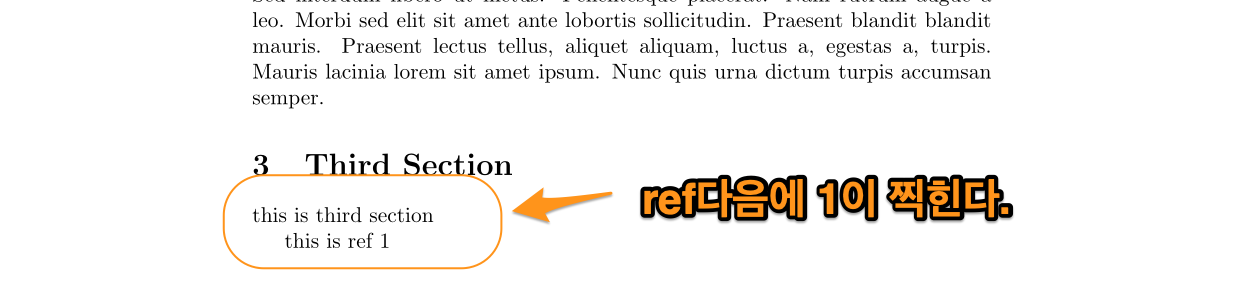
Figure 1: ref1
별다른걸 못 느끼겠다. 즉 위에서 section이나 subsection의 numbering이 중요하다고 한건, 위와같이 section이나 subsection에 label을 달고, ref로 참조하면 numbering이 출력되기 때문이였던거 같다.